Saturday, November 21, 2009

Kickin' Appss

With all the hype and countless hours of fun surrounding Windows 7 upgrades I thought I'd toss in my two wooden nickels worth of useful applications that have installed themselves into my heart. (aww... ain't that just sweet?, too bad mine's beyond fraggmented to care) These are not really Windows 7 specific, just good Windows based apps that I like. *Some of the descriptions are straight from the makers' own summaries or cnet's download.com site.*

Google Chrome Browser - "Chrome is blazingly fast and is easily the quickest browser available. Chrome is Google's attempt to make the Web browser disappear and to focus on the applications and pages users are viewing, rather than on the border with its tools." If clean and simple are your things then Chrome is the browser for you. The 'address' bar also doubles as the classic Google search bar.
Cost: FREE

Google's Picasa (3) - "Picasa is free photo editing software from Google that makes your pictures look great. Sharing your best photos with friends and family is as easy as pressing a button!" Just like they say, it organizes pictures, and makes it very easy to edit and share, especially if you have an existing Gmail account.
Cost: FREE

Libra - "Libra is a beautiful library software to manage your Books, Music, Movies and Games. You can track items you have lent out, or tag them with meaningful terms to organize them effectively. Libra can import your items from other applications, or scan them from either your webcam or any barcode scanner (including CueCat). Once you have built your collection, you can print out beautiful catalog pages of all your items." I use a 400 Disc DVD changer and store most of my kids' movies on my home network, this is by far the best way to organize them and use to pick a movie to watch. The library is also exportable to Excel for a text list print out.
Cost: FREE

DVDFab (6) - "DVDFab----Copy any DVD to blank disc/PSP/iPod or other mobile devices in smart ways, the fastest DVD copy software. Powerful and Flexible! Enjoy it!" This software can copy any movie disc and is really simple to run. I use it for full quality rips for the the kids' flicks.
Cost: Free basic edition (~$30)

Belarc Advisor - "The Belarc Advisor builds a detailed profile of your installed software and hardware, missing Microsoft hotfixes, anti-virus status, CIS (Center for Internet Security) benchmarks, and displays the results in your Web browser. " Basically it reads your entire PC and sums it up and displays it in web-browser format.
Cost: FREE

PlayOn\TVersity - Media servers to share local and web-based conetnt, see my previous post for a lot more information.

AVG Free Anti-Virus - "AVG Anti-Virus Free Edition is an anti-virus protection tool available free of charge to home users. Rapid virus database updates are available for the lifetime of the product, thereby providing the high level of detection capability." I shouldn't have to explain what this does.
Cost: You gussed it, Free

WinRAR - "Anyone seeking an all-in-one archiving solution would be remiss to not check out WinRAR." In a quick summary; its like winzip, on crack.
Cost: Free Trial, $30 full product.

VLC Media Player - This bad boy will play just about any format of audio and video out there. It also is light weight and comes in a portable version (for use on a USB thumbdrive).
Cost: FREE

This is a quick, off the top of my head type list, so if there are some apps that need some love and respect, please post it in the comments section.

Thursday, July 9, 2009

All's Well That Shares Well

No, despite popular rumors I haven't given up on this blog. In fact its kinda nice since that long break I now have more goodies to rant and rave about. So with a great home theatre comes great responsibility. First you must have content to play and this presents opportunities and challenges. Fortunately many others share this passion and have developed fantastic tools, many free, to assist A/V junkies.

To kick things off many people have access to disc based media (CDs & DVDs etc), and then classic sources like TV, DTV, satellite, cable etc. So what next? Digital streaming media of course! Terabytes (it comes after gigabytes silly) of entertainment are chomping at the bit (computer joke, did you catch what I did there?) to be played whenever you choose.

Ok so you have movies or music sitting on your PC in another room, and you want to play it on your big screen and surround sound, well what to do? What to do? Answer: Get the signal from your your home network to your theatre room, that's numero uno in making this possible. The choices are wired or wireless. If you plan on HD content of any kind go wired, period. It will be well worth any efforts of running the cable. Wireless is pretty convenient but slower and more often than not it will cost more as well. If you need help with the networking side of things, enlist the help of some friend or family member, and do the nerd in him a favor and make it worth his while. Nerds and geeks often prefer monies or foods as payment, or tickle their floppies and hit 'em with both.

Part duex is choosing a player. If you have a Wii, Xbox360, PS3, XBMC, or theatre PC (HTPC), you'll be set. If not, other players exist like stand alone media players and even some newer DVRs are capable of a great many things. The newer generation consoles and especially the more powerful Xbox360 and PS3 are ideal for theatre setups since they are made to handle HD content and have been designed to work with shared media, and by the way they play games as well.

Since most of what you'll be streaming; movies, music, and photos will be stored on a computer somewhere you need to be able to get to them. There are mainly two sources; 1. local area network (LAN or your home pc) and 2. media available via the World Wide Web. 1. LAN is often 'easier' since no high speed Internet is needed, just that wired network at home. 2. WWW sources require high speed Internet and depending on the site and content may require a paid membership or special software be used to access what you want. Many popular sites for movies and TV shows include direct network sites like CBS, ABC, NBC, ESPN etc. Other sites like Hulu and Joost are not network specific and host a wide array of videos to watch. Netflix is natively supported by the Xbox360, but with the help of software can be used on other devices.

PlayOn and TVersity
These two bad boys of media server and sharing software are both easy to use and fulfill many digital desires. They accomplish many of the same things and therefor have many similarities but have different strengths and weaknesses. Each will require that a host PC be on running the software at the time you wish to use them. Click on their names below to visit their sites.

PlayOn: This tool is most popular for streaming Hulu to your home theatre, though it is very capable of accessing other sites. Its is extremely easy to setup and use. It generally costs about $40 and has a good support staff that constantly keep it up to date. It comes with a 14 day trial to give you a chance to take it for a spin. This software uses less power from your PC to run. The ability to share your local files has been recently added. If Hulu is your main reason to bring streaming media to your entertainment room this is very recommended.

TVersity: A little more complex this one packs a powerful transcoding punch. This is meant to be able to get any media to any device, automatically. Very popular for sharing locally stored files. It detects devices accessing it and adjust the media to fit the player, all on the fly. For this reason it will require a little more horsepower to run on your PC. It also can access Hulu and other online sites but approaches it in a different manner, and in some cases not as smoothly as PlayOn. TVersity rules the locally stored kingdom. TVersity will stream media to fit your gaming console, HTPC, iPhone, PSP etc. and the list goes on. It can even allow you to access your media from anywhere in the world. They offer two flavors: Free Edition for locally stored files and a few online sources and the Pro Edition for $30 for Hulu and other similar sites.

I cannot praise both companies enough for offering solutions to fulfill our deepest streaming media desires. Since both offer trial periods or free versions they can be tested to ensure they fit your needs. I currently use both and they can run on the same PC without conflict. Other media server software exists and usually end up being more specific for a certain device or purpose. If you fill an app needs a shout out please post it in the comments section.

If you ever have said to yourself, "It would be awesome if you could just click on something and watch any movie or TV show whenever you want." That day is upon us my friends! Sure there are some wrinkles yet to be straightened out but you, the Media Pioneer, will pave the way for future users. Your grandchildren will honor thine efforts with even more hours in front of the 'boob-tube".

Sunday, August 24, 2008

Updates and Upgrades

Since finishing the past 4 part article, two critical pieces of equipment have made their way into the home theater. A new A/V receiver and a Sony PlayStation 3. So yes, it has been a long time since I last posted but its not like I get paid to keep this thing up to date. Without further adieu...
Heart surgery - My Sony receiver suffered a massive attack and went the way of the dodo and joined that giant transistor in the sky. Well that lead me on quite the little adventure: find a budget minded A/V receiver with updated capabilities. After a few hours of online research I finally settled on a new unit and decided the extra bucks were worth it to pick it up at a local brick and mortar store. I had in mind a receiver capable of 7.1 channels and HDMI connections to be able to take advantage of the fact that HDMI combines both HD audio and HD video in a single connector. This was important since the PlayStation 3 I was looking into supported both of those features for its Blu-ray playback abilities. Pretty simple really, find a decent brand with those features and I was set. It came down to a Sony and a Denon, and since my Sony just died I was willing to give the Denon the nod. It was about $250 cool ones and I took it home itching to hook it all up. Well hook it up I did. I hooked up the recently purchased PS3 and my DVD changer via HDMI, which eliminated the secondary audio cables, and cranked up the volume! Soon there was great HD video being projected, but silence remained. I double checked my settings, connections, and source selections, everything seemed right but why wasn't I hearing a dang thing? Ashamed I reverted to my user manuals. All the instructions I had followed were still not resulting in sound. I turned to the back of the manual to the troubleshooting section. There hidden away I found my answer: the unit I purchased supported HDMI video pass-through, no audio would be available through HDMI. Well what in the hump is the point of that!? I really liked the unit otherwise but decided to return it. The second trip back I was prepared to look specifically for HDMI audio support. Turns out as I scanned the spec sheets and asked the in-store 'experts' they really had no clue. I then visited the manufacturer's websites for full specs again to find that this feature was very well hidden in a mud hole of data and numbers. The fact that most 'lower' priced models fail to support audio processing via HDMI is a dirty little secret they like to keep hidden, hoping the average end user is too passive to care. Well the fact remains that optical and coax cables don't support 7.1 channels, only HDMI and 8 separate audio cables are available for 7.1 audio. So lesson learned. The cost? well it took nearly $500 to fulfill my wish list, as time has passed since this episode I am glad to note that prices for these fully capable HDMI units are steadily dropping.

The new unit - Denon AVR-1908 7.1CH A/V receiver. This unit, and its slightly updated brother the AVR-1909, pack a lot of features into fairly reasonably priced packages. They run around $600 at full retail (although you should never have to spend the full amount as a little bit of shopping around will save you some $$$) and are well built. The 1908 uses high quality power supplies and sound processing circuitry. This is not gonna be a full run down of all specs as they would be a lot of dry fun and this is simply a quick overview of the recent upgrades to the theatre. For a full list of what's under the hood, please visit Denon AVR-1908 site. I instantly noticed big differences in the little things in the audio of my favorite movies. The channel separation as well as the balance was a huge improvement over the old Sony. Setup was a fantastic breeze. The unit detected the 6.1 setup as well as includes a mic for detecting each speakers distance, frequency response, volume, and room acoustics. This takes all the guess work out of it, and even after months of listening I still agree with the adjustments the automated setup made.
Not everything is rainbows and penny whistles. The user interface is odd and getting into certain menus and features are confusing, as well as understanding what settings are available and when are not made a whole lot easier even with the help of the user guide. Granted that all slowly becomes easier with time and once the time for tinkering has passed and you get all your preferences locked down its just daily functions like source selecting and volume. 
Overall this unit gets high marks and would be a welcome addition in any home theatre on a budget.
PICTURES:


Monday, April 28, 2008

Home Theater, On a Budget Like Mine - part 4

ACT IV (The Finale): Make the Most of Your System Well if you've read the three previous posts I'd like to thank you for getting this far. Think of this as the bonus features on a DVD. We've traveled through the environment of a great home theater, looked closely at the projector, and hopefully you we're listening during the ramblings on about the surround sound. What more could we possibly talk about? Glad you asked, because there is more. This is a rundown of a few items that enhance the use of your system and ensure that you squeeze the most of your investment. Then we'll finish with a full list of all items pictured and noted in this 4 part post.(Before you continue, it's wise to read this.)

*The DVD player - I noted earlier that I opted for a 400 disc DVD player. The unit I use at home features HDMI and Component output for high quality and features an upconverter. Upconversion helps crispen up the video output before getting to your HD projector or display. Your HD capable unit has a higher resolution than a standard DVD and when a lower resolution signal is displayed it often takes on a fuzzier or less detailed look since its 'spreading' that image and upconverting DVD players help cut down on that effect. Also the other benefit of a 400 disc player is the elimination of the need for a DVD rack, keeping the clutter down to a minimum. Also on that not the projector setup also allowed me to have a home theater with no need for an entertainment center again freeing up a lot of space in the mixed-use room of mine.

*High Definition - With digital broadcasts coming and the latest format war between HDDVD and Bluray ended its time to prepare yourself. First digital does not mean HD. Did you catch that? If not, read that line again. I'm sure that's eventually where its all headed, but when over the air (good ol' rabbit ears) goes digital it only affects those not currently with cable or satellite TV. HD media will be present in select digital broadcasts, and certain satellite and cable channels and programs. Slowly more and more programming will move toward HD. Home movie viewing changing quite a lot actually due to Bluray and internet streaming/downloadable content. Bluray is simple and in my opinion going to be the most common for some time. You buy a Bluray player or PS3 gaming console a Bluray movie disc, pop it in and enjoy. For internet content there are subscription based services streaming to your PC, latest gen gaming console, and a few more services in the works.

*Media Centers - Truly add another dimension to your home theater by combining the best of PC entertainment as well. PCs designed to fit into your array of home theater components are PCs featuring TV tuners, music and video libraries, the internet and so on. With wireless keyboard and mice sets designed for use while lounging on the couch its the best of both worlds. In my list of favorite things article I mentioned XBMC (Xbox Media Center) which in my case is a software modified Xbox that can play games, and manage my media, check weather, watch movie trailers just for starts, and so much more, it's all the PC without the PC.

*The Other Rooms - Don't let your other rooms feel left out just 'cause one of them has been graced with a sublime home theater. Most A/V receivers come with Room B or Room 2 speaker outputs. It's just like it sounds, it'll play to either the main room and a secondary (or outside on the patio) or both. With my 2.4GHz wireless (think cordless phone) Xbox controllers I can go any where in my house adjusting volume and changing songs as I am cleaning up or just relaxing. I put two floor speakers in my front room to fill my whole house with music of my choosing.

*Home Networking - Take your mother's advice and be sure to share. Share your internet connection and media storage to all PCs, media center PCs, or XBMC units throughout your home. Again, in my favorite things article I mentioned another fabulous device the Linksys NSLU2 Network Attached Storage (NAS) adapter. Basically it converts an external Hard Drive's USB connector to work through a network cable. This allows 24hr access to your files from any device in the home, without a dedicated PC to be on all the time in order to share your data. It's not the only adapter out there, but it's a great flexible small device that can hook up to two hard drives and has a lot of features.

*Well that about does it, 'cuz I'm sick of all this typing. So as promised I'll sign off with a few more pics and a full list of all that I use in the home theater I put together (on a budget like mine).

Projector: Mitsubishi HC1500 DLP (720p)

Screen: Optoma Panoview 92" Grey Wolf, pull down

A/V receiver: Sony STR-DE695 6.1 Channel Receiver

DVD Player: Sony DVP-CX995V 400 Disc DVD/CD player

Speakers: Harman Kardon HKTS 8 (6.1) Home Cinema System

Speakers (room B): Infinity Reference 2000.4 Floor Speakers

Console: Xbox, soft-modded with XBMC (Media Center)

Data Storage: Linksys NSLU2 2-port USB 2.0 HDD network storage adapter

-and the last 3 pics:


Screenshot of the main XBMC menu screen
Though not particularly pleasing to the eye, this closet hidden mess stores nearly 1TB of information. The NSLU2 is the small furthest to the rear.
Infinity Reference 2000.4 floor speaker, classy looking unit I think, looks at home in my front room.

Saturday, April 26, 2008

Home Theater, On a Budget Like Mine - Part 3

Act III: The Sound The room is prepped, the stage set, the projector mounted and dialed in, you pop in your favorite flick loaded with great special effects. Everything looks great, but how does it sound? That's the question we'll answer in this segment. It is said that the great and almighty George Lucas stated that the sound was 50% of a movie. Well I think he is right. A lot of time and effort is spent tweaking the audio just so on any movie no matter how basic, but the fun sets in when there is at least 5.1 audio channels synchronized and adjusted to immerse you in movie land.
*First things first, lets follow the flow from its source. We won't go into too much detail between Dolby Digital, DTS, etc., but touch upon technical data as it is necessary. So whats on that disc anyways and what are you missing by not taking advantage? Well most movies are Dolby Digital 5.1 encoded. So here is the break down: 1. Center, 2. left front, 3. right front, 4. left rear, 5. right rear, and 6. subwoofer (yes 5.1 actually means SIX speakers). So if the disc contains all that info lets take advantage of it and stop using a simple 2 channel setup, its bad for the karma and makes audiophiles (name adopted by those with an obsession to all things audio) angry enough to make you swallow a tweeter.
*Decode, amplify, and distribute. The reason most movies are Dolby Digital 5.1 is because it will work with both 2 channel and 5.1 home configurations with no action required on your part. DTS and other similar 'advanced' encodings require that you choose that option on a movie's language or audio menu. This is because the DTS signal is purely a data signal that needs to be decoded by another source. 5.1 audio requires a receiver and for DTS a compatible decoder must also be present. The more advanced audio signals can only be transmitted through a true digital cable (sometimes called a SPDIF), such as a digital coax cable (looks like a regular RCA style plug but there is just one for all channels) or an optical (toslink) cable. Then your receiver decodes the digital goodness and amplifies the signal and sends it to your speakers. Pretty simple really, but to make it work you need to have the digital output enabled, the right cable and of course a receiver and all the speakers.
*Lets assume you have your DVD player setup for digital output and you have the right cable in hand, now onto the receiver and speakers. These need to be considered together. You can use either a HTIB (Home Theater In a Box), or a component set where you piece it together. First lets talk about the most popular choice the HTIB. Usually chosen for cost savings but also for simplifying things. They can come with or without a DVD player. A lot of audiophiles will consider you filthy and unclean for going this route but I am not quite so against it. A decent set will usually save you money and sound pretty darn good, bang for buck speaking. A component set gives you much greater flexibility but will often times set you back a few more clams. For most folks going this route it is recommended to use a A/V receiver. A/V receivers will be the central component in your home theater. All audio and video signals will route first to the receiver then to your display and speakers.
Sony STR-DE695 6.1 Channel A/V Receiver
Rear connection panel, it's not as complex as it looks
For speakers it is usually recommended you buy the same series of speakers or a matched speaker set. This ensures that you get speakers that work in harmony so your audio output has no odd spikes at certain frequencies and conversely holes in other areas.

HARMAN KARDON HKTS 8 6.1 HOME CINEMA SYSTEM
*Speaking of speakers......the basic loudspeaker design has been the same for probably 100 years or more. Manufacturers really have dedicated most of their efforts into perfecting the design. So one might think that after a century of redesigns that things are calm in that industry but that's just not the case. It seems every year someone comes up with some other new way of perfecting the output. Moving along to the number of speakers needed (or desired). Again 5.1 being the standard so 6 total are needed. 5 satellite or surround speakers and one subwoofer. There are 7.1 encodings coming up on Bluray High Definition so be prepared if you absolutely have to be up to date. The difference is in the rear, (thank you for noticing , I've been working out) instead of simply having 2 rear speakers there are four, 2 to the side/rear and 2 more behind the listener, but lets stick with the 5.1 since the principles are the same. 1.The Center Chanel: this is the most important since the majority of all sound comes from this little beast, so make sure yours is up to the task.
Front wall mounted center channel speaker
2/3. The Left and Right Front Speakers: these also see a lot action. Another aspect that is overlooked in home theater design is music. If you plan on also using your audio system for music listening, and you take your music listening seriously, get a good pair of front speakers. 4/5. The Rear Speakers: these don't see as much action as the rest but are absolutely critical in adding depth and transform a sound system into a surround sound system. 6. The Subwoofer: probably the most fun of them all. No home theater is complete without it (since that streaming data signal dedicates a complete channel to it alone). Your smaller speakers are just not capable of producing the lower end of the sound spectrum. These require their own amplifier (usually built in) and are larger than the other speakers.

10" Subwoofer in current location (Yes in a corner but properly tuned works well in this location)
*Location, location, location. Speaker placement is as important as going through the effort of buying all those in the first place. Nothing gets under my skin quicker than to visit someones TV room and seeing all 6 speakers next to or around the TV facing out to the listeners. Whats the point?, just box up those rear speakers, it'll save you the clutter. So lets start with the Center. This needs to be as close and centered (whoa, is that where it gets it's name from?) to the TV or screen as possible, just below or above is the usual. The two front speakers should be within 12"MAX height difference compared to the center channel and wide enough to create a sense of space and width. The rear speakers should be slightly higher than the listening level and usually a bit more directly facing the listener. The Sub, well that's a different story. Bass or low frequencies are not very directional, you've just got to play with it a little before settling on a good spot. Most experts recommend the front. Also be aware that corners will amplify certain low frequencies, so in general experts say to avoid them since they alter the designed sound output. A good spot lets you get rumbled pretty good with out being able to pinpoint the sub's location with your eyes closed.
*SO with these principles in place you should now be able to add fantastic sound to match your fantastic picture!

Friday, April 25, 2008

Home Theater, On a Budget Like Mine - Part 2


Act II: The Projector
This is where we get into the heart of home theatre. The projector is a very different animal from its cousins the big screen TVs. A projector set up creates a much more genuine theatre feel and is the way most movies were meant to be enjoyed. Understanding the design factors and the advantages and disadvantages of certain models and how they apply to your situation is unfortunately a bit more complex than buying a TV. Also we'll examine the least discussed and understood, yet ever so vital 'liver' of home theatres; the projector screen.
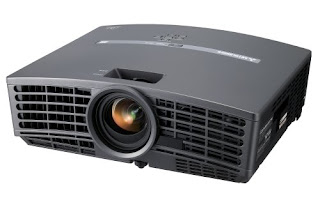
*Projectors come in two main flavors; 1. DLP and 2. LCD. Each come in a variety of resolutions, brightness, and single and triple image processor setups. DLP uses a bulb shinning through a spinning color wheel then onto a chip made up of tiny mirrors which move according the the image its trying to portray. An LCD projector is not very different than your flat screen computer monitor. A light shines through a thin crystal panel that adjusts the color of the grid system according to the image as needed. I won't go much into the history or technical nuts and bolts but give some more insight as the market is at this moment (Spring 2008). DLP usually has the contrast advantage, or difference between the projectors brightest white and darkest black. (You'll see this listed as a ratio of something like 2500:1) Because the DLP mirrors are either reflecting or not, its easy to switch between full brightness and 'off'. Because LCDs have to try and block that very bright and hot bulb from shinning through the very thin film its harder to completely block it. A lot of people will be heard saying that DLP projectors have better black levels than their LCD brothers. LCD technology is more established and traditionally DLP with their color wheel, has struggled a little bit with color accurateness. The newest and more expensive models from either side of the camp have better technology to deal with these issues. There used to be a big price difference but as it stands right now they are pretty close (excluding the highest end triple DLP 1080p projectors which costs more than you would like to know).

*Moving along to resolution. This will determine the price range faster than any other spec. Since this is all for the home theatre application we will leave the 4:3 full screen (think old square TV) resolution units out of this, and focus on 16:9 widescreen resolutions. With HD on the move, the primary resolutions are as follows: 480p, 720p, 1080i, and 1080p (also referred to as full HD). ***mind your P's and I's: p= progressive scan, means that the horizontal resolution is , for all intents and purposes, doubled compared to the i which means interlaced.*** 480p is 720x480 and the resolution of the majority of regular DVD movies. 720p is 1280x720 and 1080p is 1920x1080 (1080i is pretty much a worthless resolution since due to the interlacing of the horizontal resolution it is no better than 720p). So its actually pretty simple the bigger the number of pixels or dots the better the resolution and therefor a better picture, all else being equal.

*Brightness, briefly discussed in part 1 of this post, is also very important. The brighter the projector the more flexible it is with the lighting conditions. A dim projector requires you to black out the whole room while a very bright projector can be used in a variety of light conditions.

*Bulbs. A big difference than most display types is that projector bulbs are like most any other light bulb, they need to be replaced. Most last between 2,000 - 5,000 hours and cost $300 - $400. You have to keep that cost in mind when buying one. Also check with the company you're purchasing your unit from, most have 1-4 yr service plans that will replace the bulb 1-2 times during that period, saving you hundreds of dollars.

*Installation, another big consideration is whether or not the projector you desire will work in your desired location. Check with the manufacturer or use a online projector calculator.

*-*Ok so lets get down to a few other details people will come across that I think need a little more attention. You need to realize that projectors do not have TV tuners built in. As long as you are using satellite or the equivalent you're ok. Another tid bit is the cost. People assume that because its not a TV it should be cheaper, but lets take a glance at that. These home theatre units usually have complex video processing brains to compensate for a myriad of resolutions and fast moving video that they have to deal with. Projectors are also extremely PC friendly, making it easy to hook up your laptop or home theatre PC. Finally the resolutions of the main LCD or DLP image processors are quite amazing. Lets simplify things for our mathematical comparisons. Lets say that a DLP mirror chip is 1 square inch. So a 1080p of 1920x1080 pixels equals 2,073,600 dots per square inch! Now a 50" 1080p plasma uses the same number of pixels or cells with just over 1,000 square inches dividing 2,073,600 pixels by that is 'only' a hair under 2,000 pixels per square inch. So as you can see by our very simplified mathematics we're talking about some serious hardware.

*Onto the the screen. This ultimately determines the size of your image, and like the rest of using a projector isn't as simple as you might think. The screens use different materials and can be portable and mounted on an easel, permanently exposed, manual pull downs, and automatic as your projector either turns on or off. The biggest misunderstanding is a term called 'gain'.

*Gain - a number system used to measure the reflectiveness of the material of the screen. A gain of 1.0 is considered the base or neutral gain amount. Think of it as a plain white sheet of paper. A gain of 0 is like the black hole of your dryer that eats socks and a gain of 2.0+ is like the reflective lettering used on a street sign. Low gain screens will require a brighter projector but usually help balance extreme color contrasts like a movie scene with fluffy white clouds on the top and a dark forest in view below. A screen with high gain helps with projectors with lower native contrasts ratios and help compensate for a dimmer unit. They have another disadvantage if they go too high, and that's called hot spotting. Meaning they are brighter when viewed at the same angle as the projector than view that are more extreme, low and neutral gain screens help even the image at all angles. Most screens fall between .8 and 1.2 gain and are great for most applications.

*So for my setup I ended up going with the Mistubishi HC1500 DLP 720p projector. It combines a lot of great fetures at a great price. I mainly used two online resources to come to the conclusion in purchasing the unit. Projector Central and Projector People
Both sites are great, Projector Central is more like a projector magazine while Projector People is a fantastic online store.
The Hc1500 in its natural habitat (I haven't yet hid the cables)
*HC1500 specs:
Resolution:WXGA-H (1280 x 720)
Display Type:DLP®; 0.62" 1-Chip DMD, 12deg. LVDS DarkChip2™ with DDP3020 Brilliant Color and 7-segment (RGBWRGB) color wheel.
Brightness:1600 lumens
Contrast:2500:1
Weight:6.5 lbs.
Warranty:1 year(s)
Lamp Life: 2000 - 3000 hours

*Optoma Panoview Grey Wolf 92" Screen
92" diagonal screen with 16:9 aspect ratio
Gain: 1.8 screen gain
Material: High-contrast, gray-base with pearl glass-beaded screen enhances black levels and shadow details
Dimensions: Height 87" Width 100" Depth 4" Weight 26 lbs.

Thursday, April 24, 2008

Home Theater, On a Budget Like Mine - Part 1

DLP, DMD, DTS, HD, LFE, SACD, DVD, 16x9, HDMI, Composite, Component, etc...................
At times these terms and more spark feelings of confusion, fear, inadequacy, disgust and so on. For me?, well to put it plainly it all kinda turns me on in an almost "giddy like a little school girl" sort of way. You can also reach this nirvana with posts like these and more! Yes indeedy with a dash of understanding you'll embrace all these terms and spout them in sonnets much like those days in middle school when the you wrote love notes to that girl with the best... uh... smile (at least that's what you scribbled to her wasn't it?). Or you may already get excited when THX intro music thunders into your ears and you're just looking for some direction and new ideas. This post provides some insight to my current setup and what I've decided to do with the funds available to me.
First lets look at the current situation and circumstances that lead to me undertaking this ongoing project. It's obvious I love audio and visual ear and eye candy, so the passion was there. Unfortunately life sets in pretty quick and stubs the toes of your dreams, but that's no reason to trip. The amount of money at one's disposal is probably the greatest factor, then you have things like kids, space limitations etc. So I did what I thought was best in MY situation.
*Also please understand that like most home projects this is a continuous project constantly evolving and adapting (and its not a cheap habit either). So you'll notice unfinished and rough around the edges real world items sprinkled within this project.
Act I: THE ROOM Alright down to business. I had an unfinished bonus room when I moved into my starter home.

The front wall just after installing the wall plates
I had a 1yr old daughter at the time (and was planning to have more) who was constantly into my DVDs and touching all the buttons and knobs on my receiver and TV. So I thought as long as the room was unfinished I'd cook up a plan to make a rug rat resistant home theater setup. I considered first wall mounting either a LCD or Plasma but after hours of weighing my options I decided a ceiling mounted projector would give a smaller footprint with a very large diagonal inch to dollar ratio. The room is about 12'x10' and only has 1 medium-large sized window (roughly 72"x48"). A projector room requires some degree of light control, period. I don't care what some salesman might try and tell you, or how the brightness of a particular unit will over come it. Granted the brighter the projector is the less control you need, but a room that can be limited in light exposure is ideal. If that's not the case then consider the plethora of flat screens out there. I painted the room in deep red and gold. When projectors are used in a room with all the lights off, the brighter colored rooms will reflect more than a darker room. After 2 hrs of movie watching the constant onslaught of bright and dark scenes can cause your eyes to be very fatigued. Take a look at the colors used in a genuine theatre the next time you go out to a movie for your inspiration.
The current room, window, curtains, rear shelf

I installed two wall lights behind the screen location connected to a dimmer switch so I could add more control to the minimum light with out flooding light directly onto the screen itself. For the window (which faces west and sees the sun from about noon to sunset) I added regular vinyl room darkening blinds and my lovely wife crafted some great black curtains that on the window side have a special 'blackout' vinyl fabric (available at almost any fabric store) to completely block the sun's rays.

The big and little kid play room, sub bottom left and wall lights
All speakers in my 6.1 setup (for you beginners that's six small surround sound speakers and the .1 refers to the subwoofer, giving you 7 speakers all together. See? all that's needed is a first grade education to get this stuff. And you worried for so long that its all so complex) are wired throughout the walls and crawl space to keep all wiring out of everyone's way. I placed the subwoofer wall plate connection in the center of the front wall so that I could move the sub around the front wall when re-arranging the furniture.
Connection Central, at rear shelf level below the projector
The next step was to figure out the best place for the receiver, DVD player, Xbox, etc. I decided to create a shelf along the back wall below the projector. This keeps the kids far removed from the equipment and drastically reduces the length of cables needed to run to the projector itself. The pictures also reveal a great secret to this adult/kid zen balance: no DVD rack or shelf anywhere! That's only possible thanks to the Sony 400 disc DVD changer (model: DVP-CX995V) to the far left of the rear shelf.

The furniture is a standard sofa and loveseat. One can easily elevate the sofa creating theater style seating but so far I haven't taken the initiative. While this room fits my needs very well its in no way perfect. The 3 doors present challenges for speaker placement and furniture arrangements . The room configuration also limits how you can arrange things, so if you absolutely feel the need to completely re-arrange furniture every six months (I'm talking to you ladies, you know how it is) be warned this will keep the room "stuck" or "as is" once completed.

Screen down, curtains drawn, rear lights dimmed.....we're ready!

92" (over 7.5 ft of diagonal goodness!) widescreen movie as seen from the rear shelf's POV
The room will be your canvas in painting your personal theatre experience and as the artist you need to understand and respect the room's strengths and weaknesses.

*******Stay tuned for the next, Act II: The Projector**********

Search This Blog

Followers